Collect submissions from an HTML form without a backend
Paste one link into action and submissions from your site land in your dashboard and on your webhook. No server, no SDK and no monthly subscription.
- Live with one line of code
- Pay only for submissions
- 100 free submissions
<form action="https://formpost.org/f/3QQPFnq8"
      method="POST">
  <input type="email" name="email" />
  <textarea name="message"></textarea>
  <button>Send</button>
</form>
- HTML
- React
- Vue
- Next.js
- Astro
- Hugo
- Jekyll
- WordPress
Three steps from markup to your first submission
Nothing to deploy, build or maintain. If you can paste a link, you can do this.
-
01
Create a form in the dashboard
Sign up and get a unique endpoint link for your form.
formpost.org/f/3QQPFnq8 -
02
Paste the link into action
A plain HTML form or a fetch call — the endpoint does not care what generated the page.
<form action="…" method="POST"> -
03
Receive submissions
Every submission is stored in your dashboard and, if you like, forwarded to your webhook.
+1 new submission
Pay for submissions, not for the calendar
Most form backends bill you every month whether your forms were used or not. FormPost does not.
100 free submissions
Sign up and test the service on a real form from your own site. You start paying only once the free submissions run out.
Live in one line
Change the action and you are collecting data. No SDK, no build step, no deployment.
Buy what you use
Top up a balance and it is spent as submissions arrive. No tiers to outgrow.
Webhooks to your service
Forward every submission to your own endpoint, with a bearer token if you need one.
Bot filter
Requests from bots and crawlers are rejected before they are stored, so you never pay for junk.
Add it to the stack you already use
The endpoint is plain HTTP. Cross-origin requests are allowed and fetch gets JSON back, so you render the success and error states yourself.
- CORS enabled — works from any domain
- JSON responses, errors included
- A confirmation page for plain forms
<form action="https://formpost.org/f/3QQPFnq8qVtVnfW" method="POST">
  <label>Your Email</label>
  <input type="email" name="email" required />

  <label>Message</label>
  <textarea name="message" required></textarea>

  <button type="submit">Send</button>
</form>
A plain form submit. The browser posts the fields and gets a confirmation page with a link back to your site.
const form = document.querySelector('#contact')

form.addEventListener('submit', async (event) => {
  event.preventDefault()

  const response = await fetch('https://formpost.org/f/3QQPFnq8qVtVnfW', {
    method: 'POST',
    body: new FormData(form),
    headers: { 'Accept': 'application/json' },
  })

  const result = await response.json()

  if (response.ok) {
    form.reset()
    showMessage(result.message)
  } else {
    // Errors come back as JSON too, e.g. submission_limit_reached
    showError(result.text)
  }
})
Submit without leaving the page. Success and failure both come back as JSON, so you render your own states.
export default function ContactForm() {
  const [status, setStatus] = useState(null)

  async function handleSubmit(event) {
    event.preventDefault()

    const response = await fetch('https://formpost.org/f/3QQPFnq8qVtVnfW', {
      method: 'POST',
      body: new FormData(event.target),
      headers: { 'Accept': 'application/json' },
    })

    const result = await response.json()

    setStatus(response.ok ? { sent: true } : { error: result.text })
  }

  if (status?.sent) return <p>Thanks!</p>

  return (
    <form onSubmit={handleSubmit}>
      {status?.error && <p>{status.error}</p>}
      <input name="email" type="email" required />
      <textarea name="message" required />
      <button>Send</button>
    </form>
  )
}
The same call from a React component. Works unchanged in Next.js.
<script setup>
import { ref } from 'vue'

const sent = ref(false)
const error = ref(null)

async function submit(event) {
  const response = await fetch('https://formpost.org/f/3QQPFnq8qVtVnfW', {
    method: 'POST',
    body: new FormData(event.target),
    headers: { 'Accept': 'application/json' },
  })

  const result = await response.json()

  if (response.ok) sent.value = true
  else error.value = result.text
}
</script>

<template>
  <p v-if="sent">Thanks!</p>
  <form v-else @submit.prevent="submit">
    <p v-if="error">{{ error }}</p>
    <input name="email" type="email" required />
    <textarea name="message" required></textarea>
    <button>Send</button>
  </form>
</template>
The same idea in Vue. Nuxt and any other SFC setup behave identically.
No plans. Just two prices
Top up a balance and it is spent as submissions arrive. No contract, no renewal date, no hidden fees.
- First 100 submissions
- $0
- 1,000 submissions
- $10
- 10 forms
- $5
- Minimum top-up
- $5
- Monthly fee
- $0
Estimate your costs
Unused balance does not expire at the end of the month.
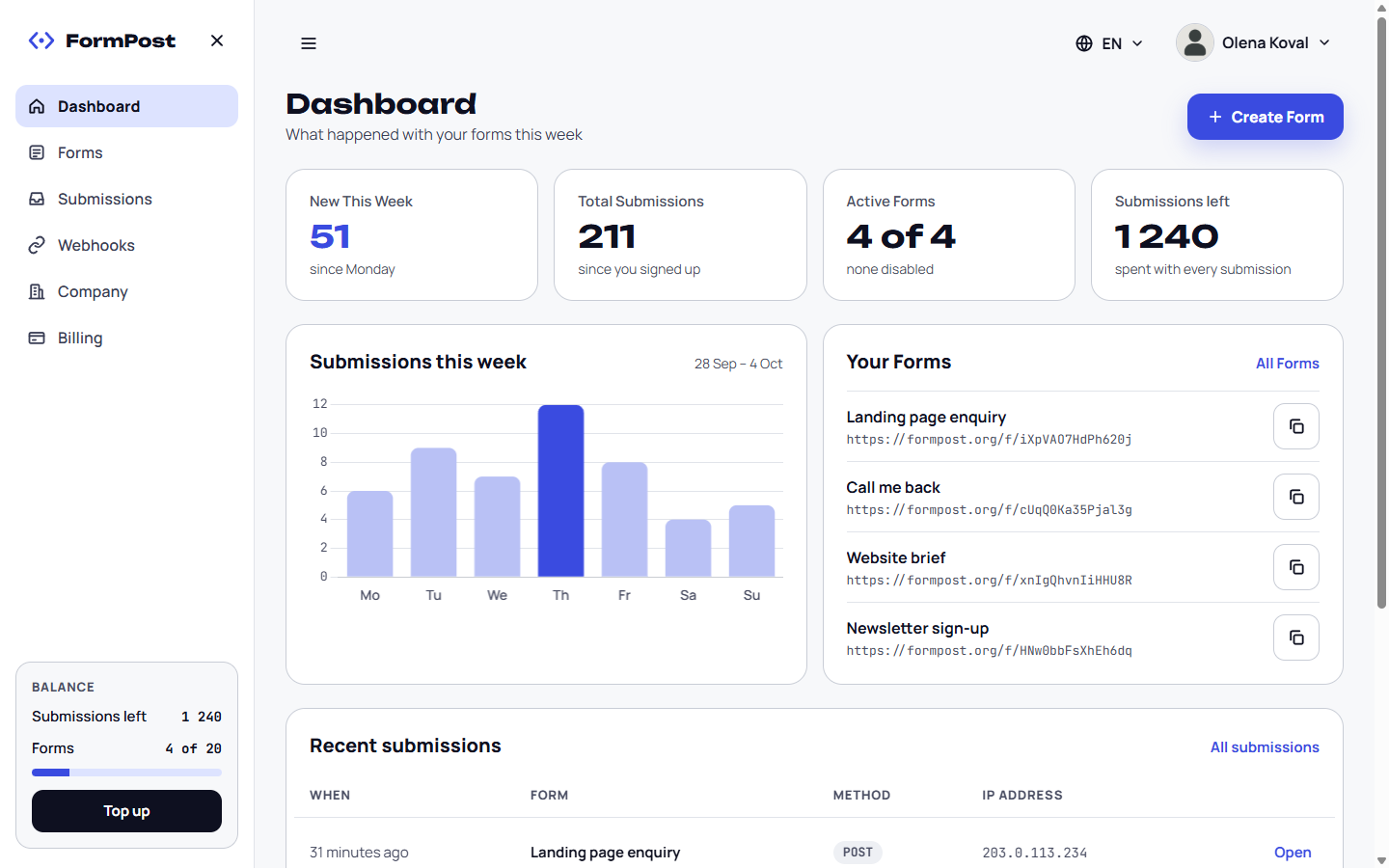
Every submission in one place
Read every submission, watch the trend, and manage your forms, webhooks and balance.
Frequently Asked Questions
Do I need a server or any backend code?
No. Point your form’s action attribute at your FormPost endpoint and submit it. We store the submission and show it in your dashboard. There is nothing to deploy and nothing to maintain.
Does it work with React, Vue, Next.js or a static site generator?
Yes. The endpoint is plain HTTP, so it does not care what rendered the page. Use a normal HTML form, or post to it with fetch from any framework, static site generator or CMS.
Can I submit the form with fetch or AJAX?
Yes, and cross-origin requests are allowed, so it works from any domain. A fetch or XHR call gets JSON back, including for errors. A plain browser form submit gets a confirmation page with a link back to your site.
How is pricing calculated?
You pay 10 USD per 1,000 submissions and 5 USD per 10 forms, with a minimum purchase of 5 USD. You top up a balance and it is spent as submissions arrive.
Are there plans or a monthly fee?
No. You buy submissions and forms when you need them, and your first 100 submissions are free.
Where does the collected data go?
Into your dashboard, where you can browse and read every submission. You can also forward each one to your own endpoint with a webhook, optionally authenticated with a bearer token.
What stops bots from filling my form?
Requests whose user agent identifies them as a bot, crawler or spider, and requests with no user agent, are rejected before a submission is stored. Submitted values are sanitised before they are saved.
Your form can be collecting submissions today
Create an endpoint, paste the link into action and your first submission is already in your dashboard.
Try it for free 100 free submissions · No subscription · No contract